Polycom Webcam User Manual Page 238
- Page / 356
- Table of contents
- TROUBLESHOOTING
- BOOKMARKS

- ViewStation 1
- User Guide 1
- Trademark Information 2
- Patent Information 2
- Environment 5
- Contents 7
- © Polycom, Inc. 2003 v 7
- Chapter 8 - Troubleshooting 9
- Appendix A - Screen Reference 10
- List of Figures 13
- List of Tables 17
- Feature Highlights 20
- © Polycom, Inc. 2003 19 21
- What is in the Box? 22
- Help Topics 26
- Troubleshooting 26
- © Polycom, Inc. 2003 25 27
- 26 www.polycom.com 28
- ❑ Description of the issue 29
- ❑ Network information 30
- Installing the ViewStation EX 31
- Television Monitors 32
- Network Interfaces 32
- Power Source 33
- Integrated Cameras 34
- NT-1 Device 34
- Equipment Installation 35
- © Polycom, Inc. 2003 35 37
- © Polycom, Inc. 2003 37 39
- 38 www.polycom.com 40
- 40 www.polycom.com 42
- Document Camera 44
- Visual Concert DC 44
- Visual Concert FX 44
- ShowStation IP 45
- 44 www.polycom.com 46
- 46 www.polycom.com 48
- 48 www.polycom.com 50
- 50 www.polycom.com 52
- 52 www.polycom.com 54
- 54 www.polycom.com 56
- ViewStation EX system 58
- Initial System Setup 59
- First System Screens 61
- 60 www.polycom.com 62
- Setting your Call Preferences 64
- OneDial Preferences 65
- Setup for IP (H.323) Calls 66
- Setting up a Gatekeeper 67
- 66 www.polycom.com 68
- Setting Video Network Options 71
- © Polycom, Inc. 2003 71 73
- © Polycom, Inc. 2003 73 75
- © Polycom, Inc. 2003 75 77
- © Polycom, Inc. 2003 77 79
- Adding a Telephone Number 80
- Setting up the Firewall 81
- Verifying Initial Setup 82
- Network Line Check Indicators 83
- ISDN Line Check Indicators 83
- Gatekeeper Status Indicators 84
- Advanced Configuration for 85
- 84 www.polycom.com 86
- 86 www.polycom.com 88
- 88 www.polycom.com 90
- 90 www.polycom.com 92
- 92 www.polycom.com 94
- 94 www.polycom.com 96
- Overview 98
- About Polycom OneDial 99
- ViewStation EX User Guide 100
- 98 www.polycom.com 100
- ❑ Gateway Number Type 102
- Figure 4-8. Gateway Screen 103
- 102 www.polycom.com 104
- 104 www.polycom.com 106
- Selecting Dialing Speeds 108
- © Polycom, Inc. 2003 107 109
- Setting the Calling Profile 110
- © Polycom, Inc. 2003 109 111
- © Polycom, Inc. 2003 111 113
- © Polycom, Inc. 2003 113 115
- © Polycom, Inc. 2003 115 117
- © Polycom, Inc. 2003 117 119
- 118 www.polycom.com 120
- 120 www.polycom.com 122
- 122 www.polycom.com 124
- 124 www.polycom.com 126
- 126 www.polycom.com 128
- Dialing Rules 2 130
- © Polycom, Inc. 2003 129 131
- © Polycom, Inc. 2003 131 133
- © Polycom, Inc. 2003 133 135
- © Polycom, Inc. 2003 135 137
- © Polycom, Inc. 2003 137 139
- Configuring SNMP Preferences 140
- © Polycom, Inc. 2003 139 141
- © Polycom, Inc. 2003 141 143
- Using the ViewStation EX 145
- Remote Control 146
- © Polycom, Inc. 2003 145 147
- © Polycom, Inc. 2003 147 149
- Video Calls 150
- © Polycom, Inc. 2003 149 151
- Using Two Numbers 153
- 152 www.polycom.com 154
- Placing a Speed-Dial Call 156
- © Polycom, Inc. 2003 155 157
- Ending a Video Call 159
- © Polycom, Inc. 2003 159 161
- Address Book 163
- 162 www.polycom.com 164
- Transferring the Address Book 166
- Using the Global Address Book 167
- 166 www.polycom.com 168
- Selecting a Far-Site Camera 170
- © Polycom, Inc. 2003 169 171
- © Polycom, Inc. 2003 171 173
- Controlling Sound 175
- 174 www.polycom.com 176
- 176 www.polycom.com 178
- Using the Graphics Cursor 181
- 180 www.polycom.com 182
- Multipoint Calls (Optional) 184
- Before you Begin 185
- Multipoint Downspeeding 186
- © Polycom, Inc. 2003 185 187
- © Polycom, Inc. 2003 187 189
- 188 www.polycom.com 190
- 190 www.polycom.com 192
- Mixed Protocol Dialing 194
- Additional Information 195
- Multipoint Viewing Modes 196
- Mode Description 197
- 196 www.polycom.com 198
- Using the Meeting Password 200
- Meeting Password Settings 201
- Password 201
- © Polycom, Inc. 2003 201 203
- © Polycom, Inc. 2003 203 205
- Dial-In Calling (Optional) 207
- 206 www.polycom.com 208
- Conference on Demand (COD) 211
- COD User Interface Screens 212
- ❑ Never 213
- ❑ Always 213
- Streaming Video 214
- Configuring Streaming Options 215
- 214 www.polycom.com 216
- Data Conferencing 218
- Using a ShowStation IP 219
- Using Microsoft NetMeeting 219
- People+Content 220
- Using the System with a PC 221
- © Polycom, Inc. 2003 221 223
- © Polycom, Inc. 2003 223 225
- Configuring your Web Browser 227
- Netscape Configuration 228
- 1. Launch your Web browser 229
- 2. Select Edit from the menu 229
- To set the cache: 229
- Accessing the Web Interface 230
- Features of the Web Interface 231
- 230 www.polycom.com 232
- 232 www.polycom.com 234
- Figure 7-3. pcPresent Screen 236
- © Polycom, Inc. 2003 235 237
- © Polycom, Inc. 2003 237 239
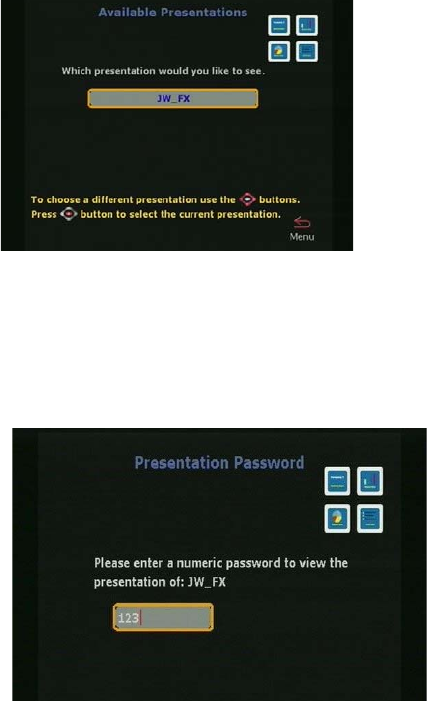
- Viewing a Slide Presentation 240
- © Polycom, Inc. 2003 239 241
- © Polycom, Inc. 2003 241 243
- PC-Resident Applications 245
- 244 www.polycom.com 246
- Accessing NetMeeting 248
- © Polycom, Inc. 2003 247 249
- 248 www.polycom.com 250
- 250 www.polycom.com 252
- Open and Save Profiles 254
- © Polycom, Inc. 2003 253 255
- System Diagnostics 257
- Virtual Remote Control 258
- Send a Message 259
- Call Detail Report (CDR) 260
- © Polycom, Inc. 2003 259 261
- Streaming 263
- 262 www.polycom.com 264
- General 266
- Symptom Cause Solution 267
- Network and Communications 271
- LAN/Intranet 274
- Presentations 275
- 276 www.polycom.com 278
- © Polycom, Inc. 2003 279 281
- Advanced Network Statistics 283
- 282 www.polycom.com 284
- Generate Tone 286
- Near End Loop 287
- Far End Loop 288
- Reset System 288
- User Setup Screen Reference 289
- 288 www.polycom.com 290
- 290 www.polycom.com 292
- Admin Setup Screen Reference 294
- General Setup 295
- 294 www.polycom.com 296
- BRI Video Network Screens 298
- © Polycom, Inc. 2003 297 299
- LAN Setup Screens 300
- © Polycom, Inc. 2003 299 301
- Data Conference 303
- 302 www.polycom.com 304
- Telephone & Audio 306
- Video and Cameras Screens 307
- TV Monitors 308
- Graphics Monitor 309
- EX VGA Monitor 310
- © Polycom, Inc. 2003 309 311
- VGA Input Calibration 313
- Security 314
- Crypto Resync Pulse 315
- Software and Hardware Screens 315
- Software 316
- Hardware Information 316
- Send Address Book 317
- Far Site Software Update 317
- System Options 317
- 316 www.polycom.com 318
- 318 www.polycom.com 320
- Interoperability 322
- Firewall/NAT Interoperability 323
- 322 www.polycom.com 324
- ° Field of View 326
- ° (up/down) 326
- ° (left/right) 326
- Table C-2 331
- ViewStation EX User Guide 332
- 330 www.polycom.com 332
- Security Screens 334
- PMAC Security Features 335
- 334 www.polycom.com 336
- Digest Implementation 338
- Adtran 512 338
- Disabling Mixed Protocols 339
- Telnet and FTP Timeout 339
- 338 www.polycom.com 340
- Warranty 342
- EEA Regulatory Notices 344
- Special Safety Instructions 346
- Installation Instructions 346
- Numerics 347
- 346 www.polycom.com 348
- 348 www.polycom.com 350
- 350 www.polycom.com 352
- 352 www.polycom.com 354
- 354 www.polycom.com 356
Related products and manuals for Computer Accessories Polycom Webcam

 (2 pages)
© 2020, manymanuals.com. All rights reserved. | 0.053 s |
 Manymanuals.com
 Manymanuals.de
 Manymanuals.fr
 Manymanuals.it
 Manymanuals.pl
 Manymanuals.cz
 Manymanuals.es
 Manymanuals-pt.com
Comments to this Manuals